01-Build Isaac ROS environment
The HemiHex factory image already has a pre-configured environment. You can skip this step if you don't need to set it up yourself.
Introduction to the Isaac ROS Environment
The Isaac ROS suite, developed and released by NVIDIA, is designed to leverage NVIDIA acceleration on NVIDIA Jetson and standalone GPUs for developing standard robotics applications.
Isaac ROS uses standard ROS interfaces for input and output, making it easy to get started and a drop-in replacement for common CPU ROS implementations familiar to robotics developers.
System Requirements
| Platform | Hardware | Software | Notes |
|---|---|---|---|
| Jetson | Jetson Orin | JetPack 6.1 and 6.2 | For best performance, ensure that power settings are configured appropriately. Jetson Orin Nano 4GB may not have enough memory to run many of the Isaac ROS packages and is not recommended. |
| x86_64 | Ampere or higher NVIDIA GPU Architecture with 8 GB RAM or higher | Ubuntu 22.04+ | CUDA 12.6+ |
ROS Support
All Isaac ROS packages are designed and tested for compatibility with ROS 2 Humble.
If you are using ROS 1 Noetic, you can use the Isaac ROS NITROS Bridge to integrate Isaac ROS packages for faster performance.
ROS 1 Noetic is not supported on the same system as ROS 2 Humble.
Isaac ROS packages have only been tested with ROS 2 Humble. Other ROS 2 versions are not yet supported.
Quick Installation
Note: Installation failure is normal. This environment requires a proxy server to install properly. You can search online for proxy server instructions.
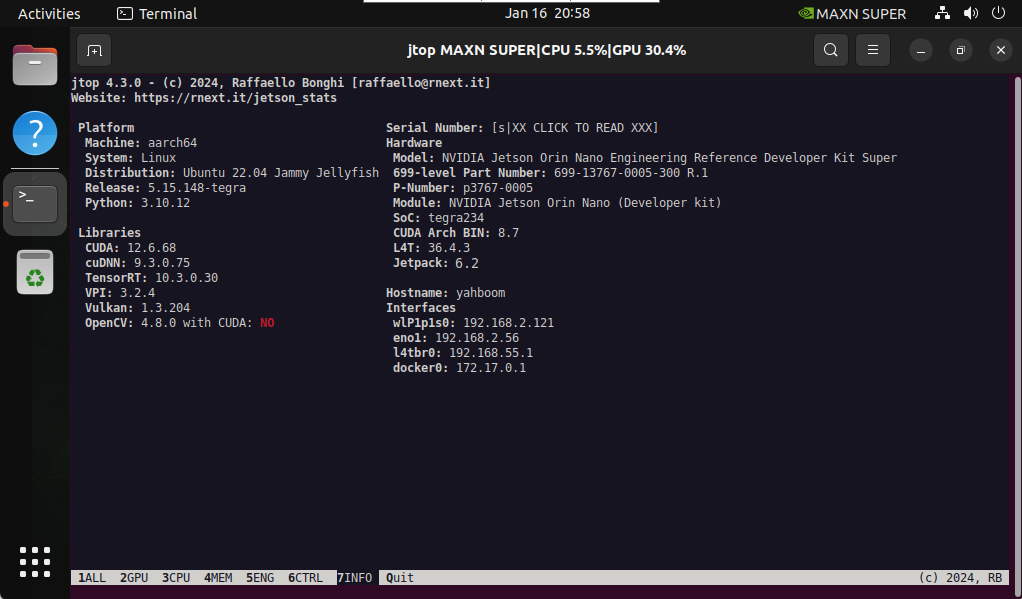
- Confirm that your system has JertPack 6.2 installed and set the system power to MAXN SUPER mode.
- Install Docker
# Add Docker's official GPG key:
sudo apt-get update
sudo apt-get install ca-certificates curl gnupg
sudo install -m 0755 -d /etc/apt/keyrings
curl -fsSL https://download.docker.com/linux/ubuntu/gpg | sudo gpg --dearmor -o /etc/apt/keyrings/docker.gpg
sudo chmod a+r /etc/apt/keyrings/docker.gpg

# Add the repository to Apt sources:
echo \
"deb [arch="$(dpkg --print-architecture)" signed-by=/etc/apt/keyrings/docker.gpg] https://download.docker.com/linux/ubuntu \
"$(. /etc/os-release && echo "$VERSION_CODENAME")" stable" | \
sudo tee /etc/apt/sources.list.d/docker.list > /dev/null
sudo apt-get update

sudo apt install docker-buildx-plugin
- Add the docker user group
sudo usermod -aG docker $USER
newgrp docker
- VPI settings
Make sure the NVIDIA Container Toolkit is installed on your Jetson device. Generate the CDI specification using the following command:
sudo nvidia-ctk cdi generate --mode=csv --output=/etc/cdi/nvidia.yaml
Install the pwa-allow-2 package:
# Add Jetson public APT repository
sudo apt-get update
sudo apt-get install software-properties-common
sudo apt-key adv --fetch-key https://repo.download.nvidia.com/jetson/jetson-ota-public.asc
sudo add-apt-repository 'deb https://repo.download.nvidia.com/jetson/common r36.4 main'
sudo apt-get update
sudo apt-get install -y pva-allow-2
- Set up the development environment
Clone isaac_ros_common under $[ISAAC_ROS_WS]/src.
cd $[ISAAC_ROS_WS]/src && \
git clone -b release-3.2 https://github.com/NVIDIA-ISAAC-ROS/isaac_ros_common.git isaac_ros_common
- Start the Docker container using the run_dev.sh script:
cd $[ISAAC_ROS_WS]/src/isaac_ros_common && \
./scripts/run_dev.sh
Wait for docker to pull successfully and the environment will be set up.